4 min read
Multi-Architecture Containers: How OCI & Buildx Made Docker Truly Universal
DockerOCIKubernetesDevOps
Why the Modern Container World Runs on OCI + BuildKit Multi-Architecture Image Building
Over the past decade, containerization moved from a developer convenience to a core infrastructure layer that powers global-scale systems.
But as the container ecosystem exploded — Kubernetes, CI/CD pipelines, cloud registries, and serverless platforms — one major problem kept surfacing:
Docker image format was never designed to be the universal standard.
This created fragmentation, incompatibility, and vendor lock-in.
To solve this, the industry converged on a layered stack.

This article explains why this mattered, how it works, and why multi-architecture OCI images are now the backbone of modern DevOps workflows.
The Original Problem: Docker Image Format Was Too Docker Specific
In the early days, Docker’s image format was:
- tightly coupled to Docker Engine
- opinionated
- not designed for multi-runtime compatibility
- missing versioned standards for layers, manifests, and configs
As soon as Kubernetes adopted containers, everyone needed a universal image format.
Platforms requiring compatibility included:
- RedHat (CRI-O)
- Kubernetes (containerd)
- Podman
- AWS, GCP, Azure container runtimes
- Serverless platforms (Cloud Run, Lambda Extensions)
- IoT and ARM devices
But Docker’s format was not vendor-neutral.
This is where the Open Container Initiative (OCI) stepped in.
OCI: The Industry Standard Container Format

OCI introduced two key standards.
1. OCI Image Specification
Defines the structure of container images, including:
- layers
- configuration
- manifests
- media types
2. OCI Runtime Specification
Defines how containers run, including:
- processes
- filesystem mounts
- namespaces
Think of it like this:
Docker → A proprietary container format
OCI → A universal open standard supported by all platforms
But Another Problem Appeared: Multi-Architecture Builds
The computing world changed.
Different environments began using different CPU architectures:
- Cloud servers → x86_64 (AMD64)
- Apple Silicon → ARM64
- Edge devices → ARMv7 / aarch64
- Emerging architectures → RISC-V
A single binary was no longer enough.
A single architecture container image was no longer enough either.
However, Docker’s classic builder could only build images for the architecture of the machine running the build.
Example:
If you build on Mac M1/M2, the produced image is ARM64.
But most production servers run AMD64.
This caused common deployment failures such as:
exec format error
Which led to:
- broken deployments
- Kubernetes runtime failures
- CI/CD pipeline issues
This forced the industry to rethink container build pipelines.
Enter BuildKit: A Modern Build Engine Designed for the Future
Docker introduced BuildKit, a modern container build engine.
Key capabilities include:
- Parallel builds
- Aggressive layer caching
- Remote cache support
- Advanced build frontends (Dockerfile v1, LLB)
- Multi-architecture emulation via QEMU
- Security features like attestations and provenance
- Pluggable exporters for multiple output formats
Examples of supported exporters:
- OCI
- Docker
- tar archives
- local filesystem
- cache exports
Important note:
BuildKit is not Docker. Docker simply bundles and uses it internally.
Buildx: The Developer-Friendly Frontend for BuildKit
Buildx is a CLI extension that exposes BuildKit’s advanced features.
Key capabilities include:
- Multi-architecture builds using
--platform - OCI and Docker exporters using
--output - Native and emulated builds
- Remote builder clusters
- Multiple output targets
- Advanced caching strategies
Buildx enables workflows that classic Docker builds cannot support.
The Multi-Level Architecture That Makes Everything Work
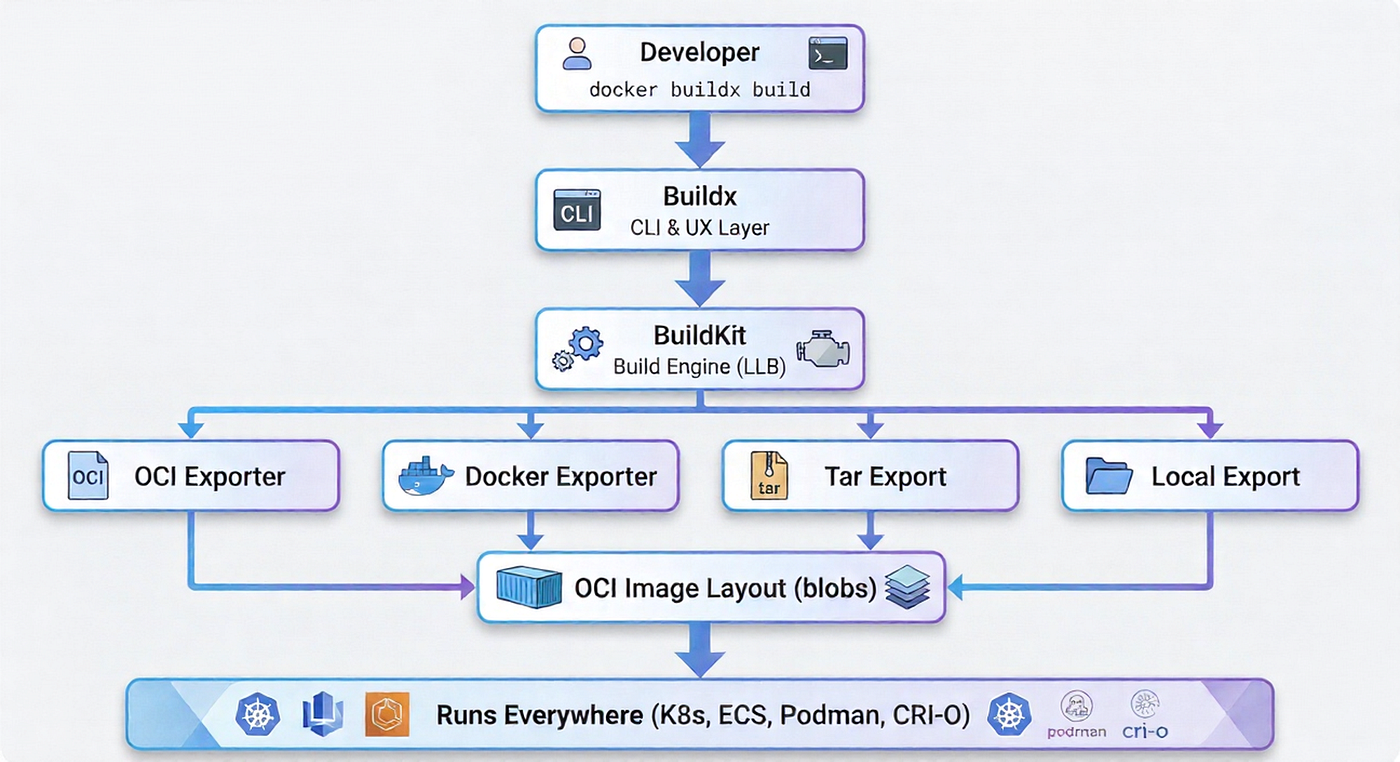
Problem 1: Architecture Incompatibility
If you build on ARM hardware (like Mac M1/M2), the image will be built for ARM.
But production servers often run AMD64.
Result: the container fails to start.
Buildx + BuildKit + QEMU Solution
docker buildx build \
  --platform linux/amd64,linux/arm64 \
  -t myapp:latest \
  --push .
BuildKit automatically produces:
- AMD64 image layers
- ARM64 image layers
- A manifest list linking both architectures
This creates a multi-architecture container image.
When a runtime pulls the image, it selects the correct architecture automatically.
Problem 2: Vendor Lock-In (Docker Image Format)
Older Docker image layouts were proprietary.
OCI solved this issue by defining a standardized image format.
Example:
docker buildx build \
  --output type=oci,dest=./image.tar .
The resulting OCI image can run anywhere:
- Kubernetes
- containerd
- CRI-O
- Podman
- AWS Lambda
- serverless platforms
- distroless environments
Problem 3: Modern DevOps Needs Flexible Exporters
BuildKit introduced multiple exporters to support modern workflows.

These exporters allow builds to output different artifacts depending on use cases.
Examples include:
- OCI image layout
- Docker image format
- local filesystem rootfs
- registry pushes
- build caches
Why OCI Exporter Matters in Enterprise Environments
OCI exporters provide several important benefits.
Long-Term Stability
OCI is governed by an open industry foundation, not a single company.
Kubernetes Compatibility
All CRI-compatible runtimes support OCI images.
Reproducibility
OCI manifests and digests allow deterministic builds.
Security
OCI images support:
- image signing
- provenance metadata
- SBOM generation
- annotations for compliance and auditing
Real-World Example: Build Multi-Architecture OCI Image
docker buildx build \
  --platform linux/amd64,linux/arm64 \
  --output type=oci,dest=./myapp.oci \
  --tag myorg/myapp:1.0.0 \
  .
This build produces:
- ARM64 layers
- AMD64 layers
- OCI manifest metadata
- A fully portable container image
You can upload the result to a registry or deploy it directly in Kubernetes.
Multi-Exporter Example (Build Once, Output Many)
docker buildx build \
  --output type=oci,dest=./image.oci \
  --output type=local,dest=./rootfs \
  --output type=registry,name=registry.io/myapp:latest \
  .
This allows a single build process to generate multiple artifacts:
- OCI image archive
- extracted root filesystem
- registry-pushed container image
Why This Entire System Exists
The industry needed:
- a standard container image format (OCI)
- a modern build engine (BuildKit)
- a developer-friendly interface (Buildx)
- the ability to build anywhere and run everywhere
This stack provides exactly that.
Conclusion
The shift from Docker’s classic builder to BuildKit + Buildx + OCI represents one of the most significant evolutions in the container ecosystem.
It solved critical problems including:
- architecture incompatibility
- vendor lock-in
- lack of standardized image formats
- slow build pipelines
- limited output options
- inconsistent container runtimes
Today, modern DevOps workflows rely on this stack to create portable container images that run on any architecture.
Build once. Run anywhere. On any architecture.
✍️ Written by Pramitha Jayasooriya